Honeycomb’s Kubernetes agent aggregates logs across a Kubernetes cluster. Stop managing log storage in all your clusters and start tracking down real problems.
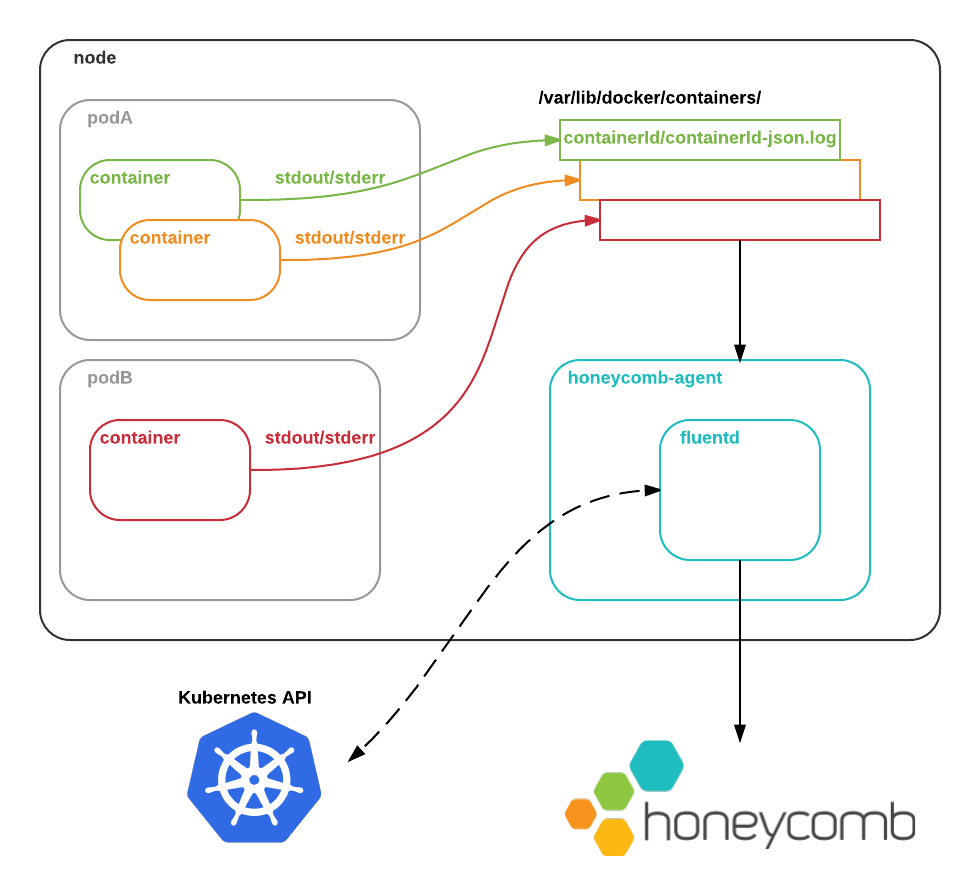
honeycomb-agent runs as a DaemonSet on each pod in the cluster. By default, containers’ stdout/stderr are written by the Docker daemon to the node filesystem. honeycomb-agent reads these logs, augments them with metadata from the Kubernetes API, and ships them to Honeycomb so that you can see what’s going on.
Grab your Honeycomb writekey from your account page, and store it as a Kubernetes secret:
kubectl create secret generic -n kube-system honeycomb-writekey --from-literal=key=$WRITEKEY
Create the logging DaemonSet:
kubectl create -f https://raw.githubusercontent.com/honeycombio/honeycomb-kubernetes-agent/master/honeycomb-agent-ds.yml
Head over to ui.honeycomb.io and query the “Kubernetes” dataset.
Note: By default, logs will be sent to a dataset named Kubernetes. To send logs to a different dataset, edit the honeycomb-agent-ds.yml manifest and change the value of the HONEYCOMB_DATASET environment variable.
The agent uses fluentd to aggregate and ship logs. You might want to modify its configuration to suit your specific needs: for example, to add custom parsing of specific logs, or to send different classes of logs to different datasets. To do that:
Grab the base configuration file
wget https://raw.githubusercontent.com/honeycombio/honeycomb-kubernetes-agent/master/td-agent.conf
and make any changes you need.
Create a ConfigMap with the configuration file:
kubectl create configmap honeycomb-agent-config --from-file=td-agent.conf
Create an updated logging DaemonSet that reads the ConfigMap:
kubectl create -f https://raw.githubusercontent.com/honeycombio/honeycomb-kubernetes-agent/master/honeycomb-agent-ds-custom.yml
The source code for the Honeycomb Kubernetes agent is Apache 2.0-licensed and available on Github.
