Update to Go SDK - Efficient Sampling

Here at Honeycomb we believe the best approach to handling high volume traffic is through sampling. As services scale, we want to continue to be able to inspect events with rich detail and context. In order to handle the traffic, we recommend sending representative samples of events, and scale sampling according to the value of the events being processed.

Our SDKs make it easy to do this kind of sampling in your code. When creating an event, you set a Sample Rate on the event and hand it off to libhoney. Our library takes care of only sending the right number of events and communicating the sampling to Honeycomb.

Here is an example using the Go SDK:

// create an event, add fields
ev := libhoney.NewEvent()
ev.AddField("duration_ms", 153.12)
ev.AddField("method", "get")
// set the Sample Rate
ev.SampleRate = 5
// send the event
ev.Send()

The code above will send 1 event for every 5 times it’s executed. When displaying your data, Honeycomb will take this sample rate into account and show you the correct totals for the graphs it displays. In the data mode views, you’ll see a column Sample Rate showing you that the row represents a number of other similar events.

Sometimes, especially in high volume scenarios, it can be expensive to generate the data you want to push into the event. In order to avoid spending the time to generate an event only to drop it immediately, you can do the sampling logic yourself. This allows you to only spend the energy to create the events that you will actually send.

// only create events 1/5 of the time
sr := 5
if rand.Intn(sr) == 0 {
  ev := libhoney.NewEvent()
  ev.Add("my_data": expensiveComputation())
  ev.SampleRate = sr
  ev.SendPresampled()
}

The SendPresampled() function does not do any sampling - it is used when the calling function has already taken care of the sampling logic. It is a little more complicated to use, because if the calling function does not sample correctly, the data represented in Honeycomb will be incorrect. However, the added flexibility will let you add instrumentation in expensive code paths while reducing the additional load on your service.

Nylas Guest Post: Ghosts in the WSGI Machine

This post is by Christine Spang, co-founder and CTO at Nylas, where they are building a better way to do email. They have a hybrid system of existing graphite and new Honeycomb analytics, and have been experimenting with using Honeycomb for debugging. Enjoy the story and screenshots … thanks Spang!!.

A little while ago one of our engineers, Jackie, was on call at Nylas when she got an alert that said:

Average API latency excluding draft_send, multi_send, & sync_deltas is over 1500ms.

This is one of our core API alerts. It’s a really important alert, because it means the API is running too slowly – either latency is elevated across the board, or latency is elevated a LOT for some customers. Either way, it’s really important because it’s impacting core reliability of the heart of our product.

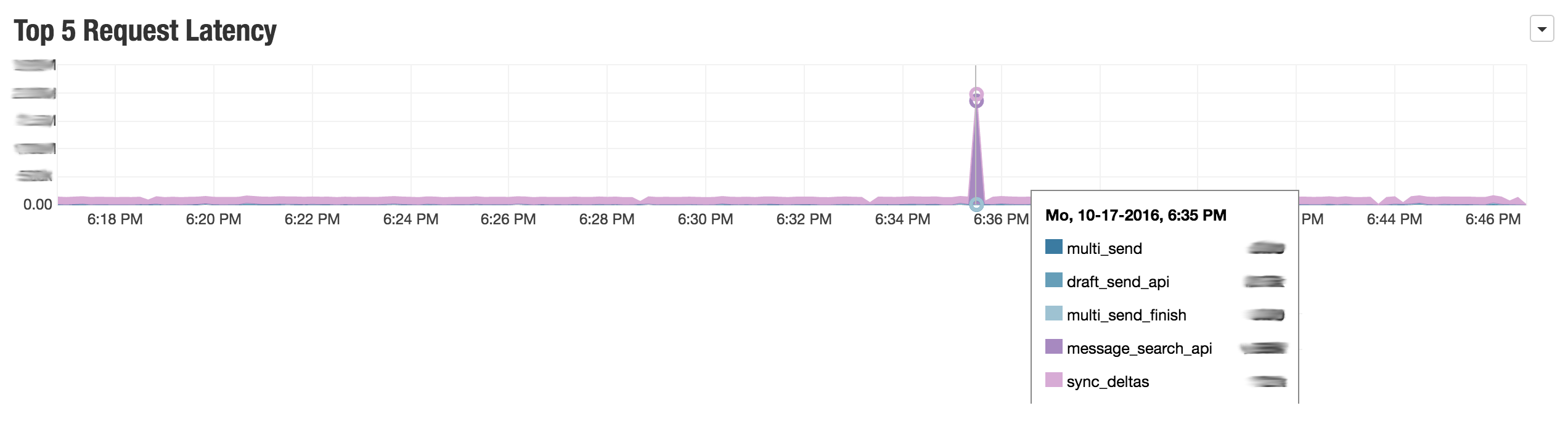
The alert linked her to this graphite dashboard, which provided some clues about the cause:

Dashboard latency alert

It was clear to Jackie from this graph (and the alert history) that the high latency was caused by a spike in latency on the message_search_api endpoint. She knew from asking her co-workers on Slack that message_search_api proxies requests to an external email provider and then streams results to the client, so it might be slow for reasons outside our control.

We wondered if it might have been caused by slow search queries. But how to verify? When you have lots of customers, it can be hard to generate dashboards for every single one of them multiplied by everything that might possibly go wrong.

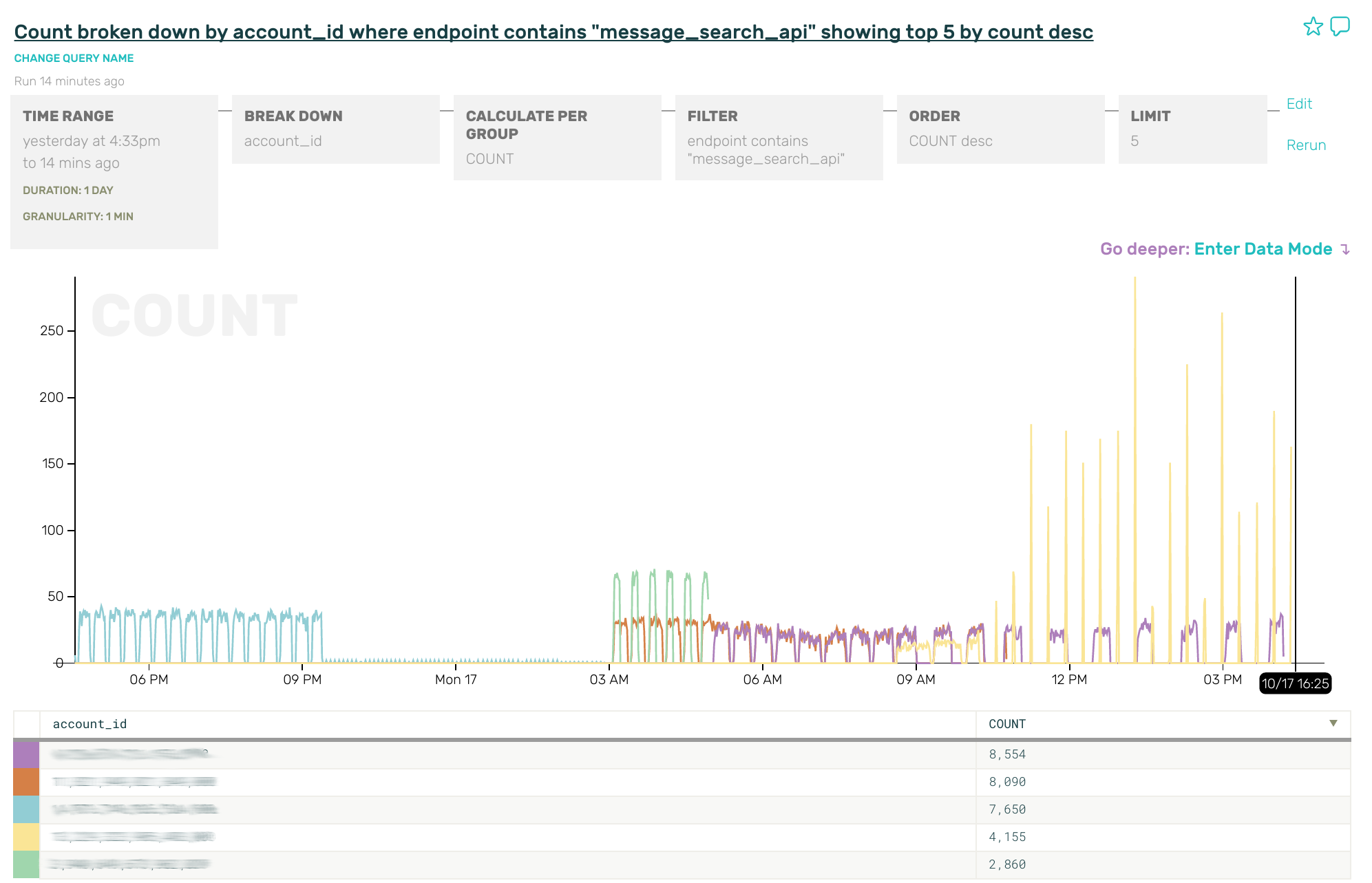
Enter Honeycomb. I pointed Jackie at the API logs in Honeycomb and a couple minutes later, unaided, she came back with this graph, which is a count of requests broken by api key:

message_search_api graph

“Could it be the yellow account??”

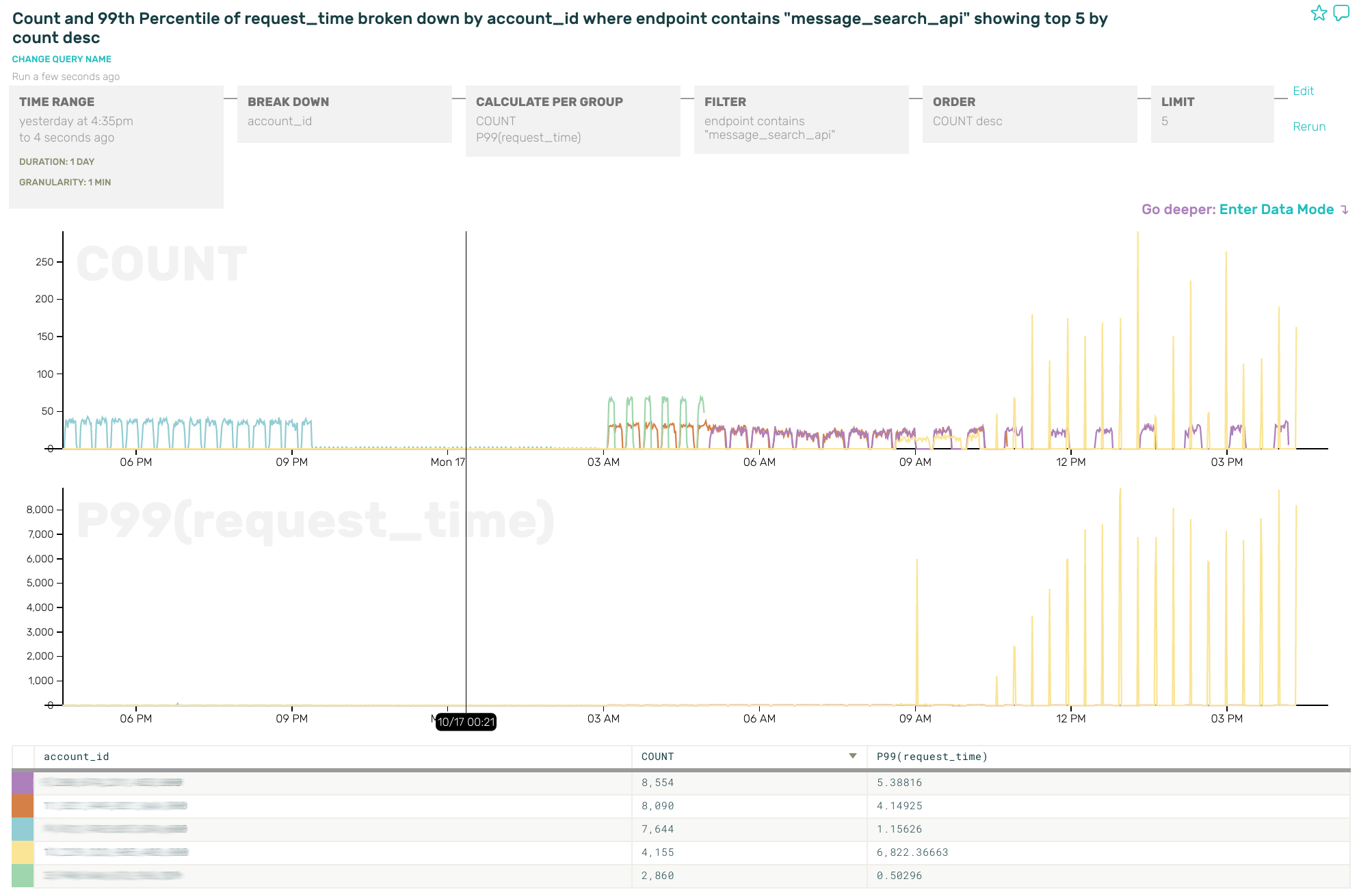
Jackie shared the URL for the search with me and I added on the P99(request_time), which confirmed the theory:

request time broken by account_id graph

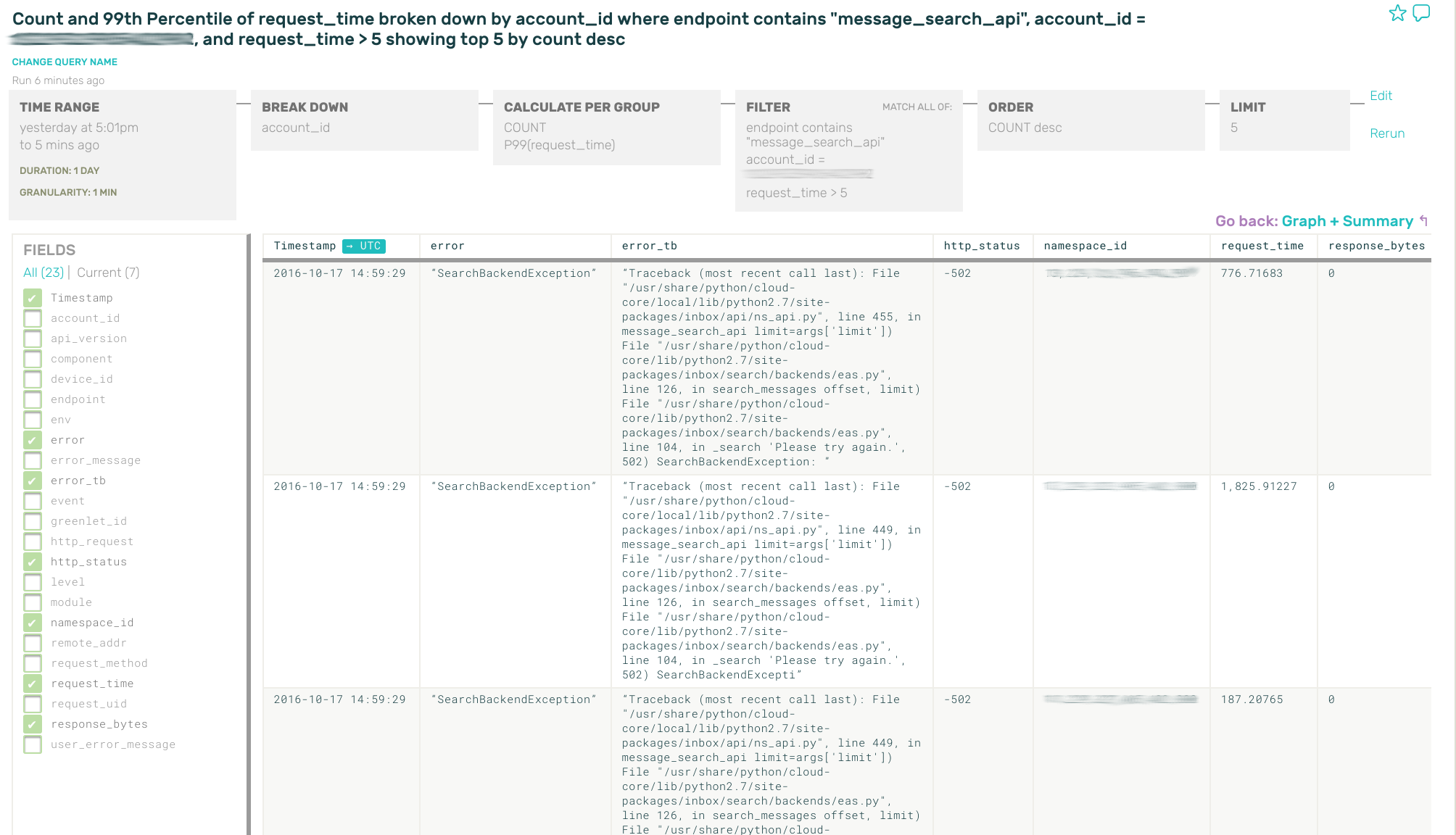
From there, I added a filter to select only that account’s rows, and headed over to data mode to get the raw HTTP requests.

Thanks to our earlier configuration while getting logs in to Honeycomb, we store stack traces directly on the log lines for all API requests, aggregating them in the request context before logging at the end of the request. So data mode tells us that something extremely bizarre is going on here:

data mode graph

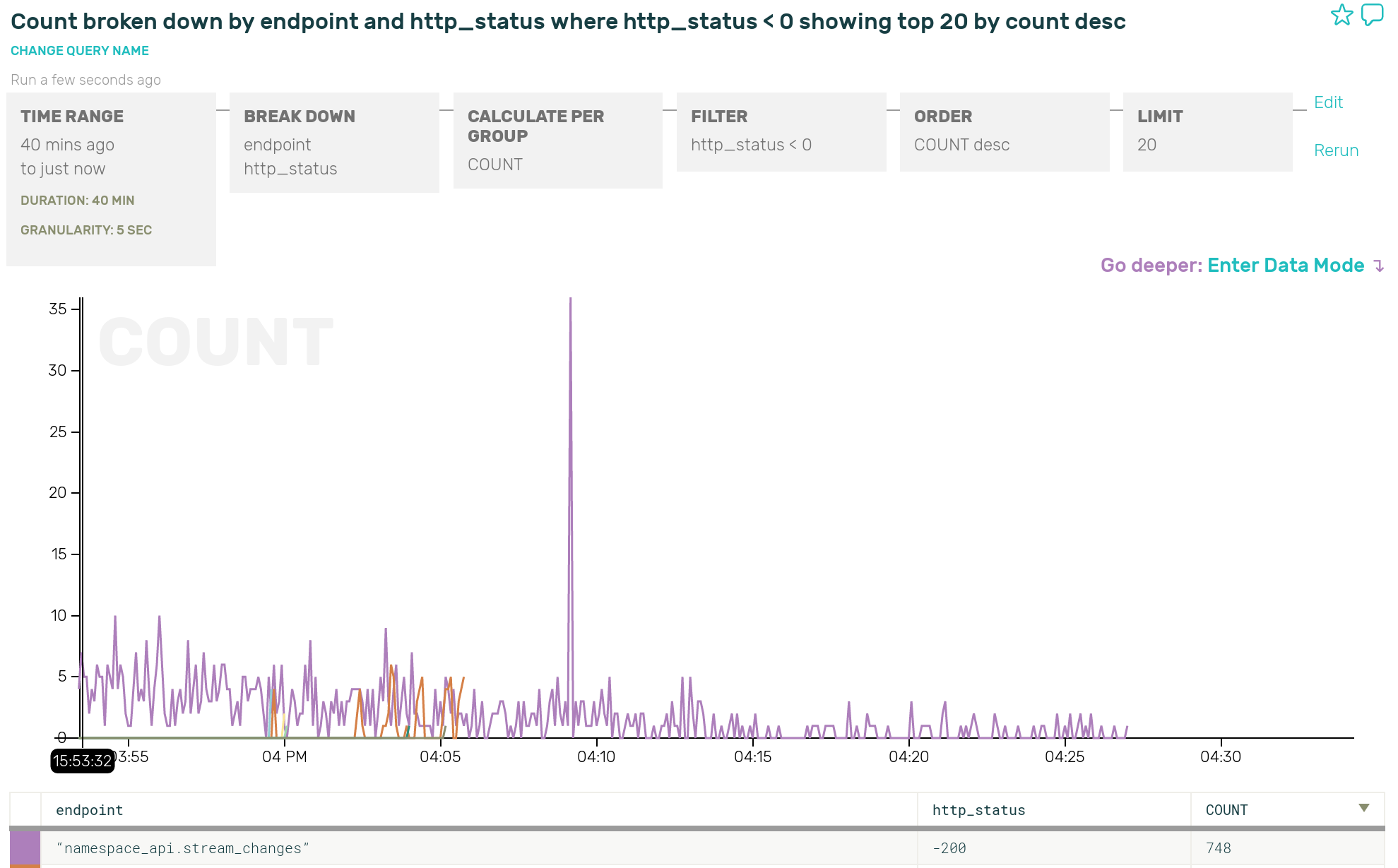
It turned out that every single one of these extremely slow API requests was eventually throwing a SearchBackendException and returning to the client with “-502” (a negative 502) after hundreds to thousands of seconds, which is very strange and really not supposed to be happening.

We haven’t closed out the case yet on this bug, but Honeycomb led us straight to the money. We might have been able to get to this conclusion in maybe 10x the amount of time by messing around with Kibana … but the grouping & calculation features and general speed of Honeycomb saved us the hassle. Without Honeycomb, we probably would have been like ¯\_(ツ)_/¯, excluded that search endpoint from the latency alert and moved on.

PostscriptAs this blog was being reviewed and posted, Spang and her team deployed the fixes to production. Here is a graph of the negative HTTP results going down and vanishing from prod. Yay!!! ~ charity

http status fixed

For the curious, you can find the reason for the negative HTTP status codes in gevent and then how to make them useful again. Relevant snippet from gevent:

except socket.error as ex:
    self.status = 'socket error: %s' % ex
    if self.code > 0:
        self.code = -self.code
    raise
self.response_length += len(data)

Nylas is hiring. :)

Get started

Sign up to try Honeycomb for free!

Honeycomb Signups Are Back! (With New & Improved Storage Support)

A long time ago, in a galaxy far far away, some of you may remember signing up for Honeycomb access. (Okay, it was probably sometime in August.)

We were astonished by the response, by the hundreds of people who signed up following our initial tweet. We approved about half of the requests we received in August, and then realized we had made some miscalculations about what people would value.

So we paused signups. For the past six weeks, we stopped processing new users, and worked instead on getting you to the awesome parts faster and providing unique value.

  • 1) Getting you to the awesome parts faster. First of all, we focused on getting you to a rich dataset ASAP. Curl-ing an example event is boring! Single metrics aren’t interesting, context is interesting. We need to demonstrate our value before we can expect anyone to invest in instrumenting their own code.

  • 2) Storage connectors. Second, we realized the obvious way to do this is to focus on what we do best: databases. DBs and storage systems were an obvious place to show off how Honeycomb is not just a bit better than existing solutions, but an order of magnitude more powerful.

As a result: we’ve released connectors for MongoDB, MySQL and MySQL+RDS. We’ll be publishing case studies and helpful tips for software and systems engineers who have fallen into the role of accidental DBA, and more connectors are on their way.

We also have connectors for Heka, Logstash (fork writes to both ELK and Honeycomb!), and plain old JSON alongside our Go, Python, and Javascript libraries. Remember that backfilling old data is as easy as streaming new logfiles, and you can purge sensitive fields as necessary.

And … we’re about to turn the signups spigot back on. :) If you signed up for an account in August, you’ll be getting an email in the next week or two. If you already have an account, we’ll be nudging you to come back and try out some of the cool new features.

Thanks so much for your support, as ever. We’re committed to changing the face of systems observability, one step at a time. Let us know how it goes!

The Honeys.
P.S. – If you haven’t signed up at all? Good lord, what are you waiting for?! Request an invite.

The MySQL Slow Query Log, AWS Golang SDK, RDS and You

Did you know you can do fun things with the MySQL slow query log, using the nothing but the AWS golang SDK for RDS?

It’s true! In order to let you submit RDS logs directly to Honeycomb, we’ve been exploring how to use the golang RDS SDK to tail the mysql slow query log. The things we’ve discovered that we didn’t find in the docs are fascinating. (All of it may very well be there somewhere, but if it is we failed to find it.)

For example:

  • The docs say the logs rotate every hour, but they don’t say it’s on the hour or what the rotating style is. The current log (slowquery.log) is rotated to slowquery.log.#, where # is the current hour {0..23} UTC. So at 18:00 UTC, the file slowquery.log.18 is written with the logs from 17:00 to 18:00 (This is mostly true. More on that later.)

  • When asking for a portion of the log file, you can hand it an index from which to start reading and the number of lines you would like to retrieve (both optional). You get back a struct with a LogFileData *string containing log lines and a Marker *string containing the index for the next segment of the log file. The Marker looks like #:#, where the first number is the hour and the second is the distance into the file.

Asking for current data is straightforward. First, ask for one line of the current log file with no marker. You’ll get back the most recent line (which you throw away) and the current marker. Wait a bit, then ask for the current file with the marker, and you’ll get all lines since that first one. Repeat.

There are two places where things get interesting: log rotation (aka the top of the hour) and asking for older data.

Log Rotation and Tiny Little Holes In Your Data

Let’s say it’s 17:58 UTC and you’re happily tailing content, fetching additional lines every 5 seconds. You get to 18:00:02 or so and the marker switches from 18:xxxx to 19:0 and suddenly you’re not getting any new data anymore. You wait and wait and … at 18:05:00, you start getting data! But it’s from 18:05:00; the data from between 18:00 and 18:05 is missing.

You take the last marker you got from your tail before data stopped flowing (with the 18: prefix) and use that marker as an index into slowquery.log.18. This gets you the data from between 18:00:02 and 18:05:00, then stops. Or! Once some amount of time (not necessarily the full 5 minutes) has passed, you can ask the slowquery.log for data since the 18:offset marker and you’ll get the data that’s missing.

Back you go to tailing the slowquery.log.

Ok, so here’s the next fun part — you can hand a marker to either the previous hour or the current hour to AWS when asking for the slowquery.log and it will give you data since then. If you do this after the 5 minute log rotation period has ended, you get all the intermediate data too! However, if you ask it for data where the number before the colon is not the current or previous hour, it ignores that and hands you back current data at the offset, specified by the second half of the marker.

You can ask for data from older files (the numbered log files) and pass them a marker, but in that case it always ignores the hour portion of the marker. It will happily return the hour portion you gave it, but it doesn’t affect the data you get. In other words, when asking for data from slowquery.log.8, passing it a marker of 12:123456 and 4:123456 are both treated as though they were 8:123456.

Try It Out For Yourself

To poke around for yourself, you’ll need to have RDS configured to write the slow query log to a file. If that’s the case, grab the DB instance identifier aws rds describe-db-instances --output table --region us-east-1 | grep DBInstanceIdentifier to list identifiers) and the log file aws rds describe-db-log-files --db-instance-identifier <ID> --output table --region <region> | sort -n to show log files.

Once you’ve got your instance identifier, log file, and region handy, download this go code 1 and give it a whirl:

go run tailrdslog.go --identifier myrdsinstanceid

Try passing it different markers and log files:

go run tailrdslog.go -i prod-mysql -l slowquery/mysql-slowquery.log.10 -m 14.123456

and see what happens!

It is especially interesting to run this across an hour boundary to see what happens as the log rolls over. The script will attempt to grab some of the data hiding in the previous log until everything returns to normal at 5 past the hour.

Output

It will output a line every 5s (the default polling interval) with:

  • the current time
  • the starting marker
  • the length of the content downloaded
  • the ending marker
  • the first timestamp encountered in the slow query log
  • the last timestamp encountered in the slow query log
  • (optional) sleep duration before the next poll
Oct  7 21:35:43 starting from 22:20523279, got 37424 content, next section from 22:20560703. first time is 21:35:39, last time is 21:35:43 sleeping 5 sec...
Oct  7 21:35:49 starting from 22:20560703, got 59056 content, next section from 22:20619759. first time is 21:35:43, last time is 21:35:48 sleeping 5 sec...
Oct  7 21:35:54 starting from 22:20619759, got 54649 content, next section from 22:20674408. first time is 21:35:48, last time is 21:35:53 sleeping 5 sec...
Oct  7 21:35:59 starting from 22:20674408, got 42533 content, next section from 22:20716941. first time is 21:35:54, last time is 21:35:59 sleeping 5 sec...

One nice thing to notice - the starting marker plus the content length gives you the ending marker. \o/

Learn More

Check out our docs for all Honeycomb SDKs.


  1. It’s terrible code! It doesn’t check that pointers aren’t nil before derefenencing them. The control flow is awkward. Ifs are nested too deeply. Code is repeated. I encourage you to do none of those things when you cargo cult snippets into your production application. :) [return]