Is Honeycomb a monitoring tool?

You may notice that we don’t talk about “monitoring” much, and that’s because we don’t really think of monitoring as what we do, even though it kind of is.

Traditional monitoring relies heavily on predicting how a system may fail and checking for those failures. Traditional graphing involves generating big grids of dashboards that sit on your desktop or your wall, and give you a sense of the health of your system.

That’s not what we do.

Honeycomb is what you do when your monitoring ends.

You still need some simple end-to-end checks for your KPIs, and monitoring for key code paths, but don’t try to “monitor everything” because it’s noisy and impossible. One of two things will happen:

  1. Your e2e checks will tell you that one of your KPIs is not within acceptable range. (So you jump into honeycomb and start asking questions.)
  2. A user tells you something is off, but your KPIs are all within acceptable ranges. (So you jump in to honeycomb and start asking questions.)

You can start at the edge and drill down, or start at the end and trace back; either way, within a half dozen clicks you can usually identify the source of the anomaly.

Honeycomb is a debugger for live production systems. Honeycomb is to your systems like your IDE is to your code. For sufficiently complex systems, you should probably spend roughly equal time in both.

Honeycomb lets you ask questions of your live systems, swiftly and interactively. Often you will spot an outlier or correlation that you weren’t expecting – something that never happens when you’re doing intuition-based debugging instead of data-driven debugging. Validate your guesses swiftly and move on.

This will make you a better engineer. :)

Systems are getting more complex every day, outstripping our ability to predict failure conditions or alert on suspicious symptoms. Stop trying to debug via intuition or what you can remember about past outages. Just keep it simple:

  1. Alert on KPIs
  2. Instrument your systems
  3. Ask lots of questions

Introducing Honeycomb's TCP Agent for MongoDB

We’re excited to release honeycomb-tcpagent, an efficient way to get query-level visibility into your MongoDB deployment. honeycomb-tcpagent parses TCP traffic between MongoDB clients and servers, and reconstructs queries in a friendly JSON format. Honeycomb helps you explore this data to quickly uncover anomalies.

Get started with Honeycomb and run the agent, or keep reading for more background and examples.

Are you running a database that’s not MongoDB? Let us know! Support for MySQL is already in the works.

Database Observability Means Lots of Questions About Lots of Data

For any serious database performance work, the ability to fully capture a workload is invaluable. The power to slice and dice by any criteria you want, doubly so. What’s the read vs write breakdown? Okay, how about for a specific collection? What’s the 99th percentile latency for a particular query family? Maybe network throughput seems high compared to query volume — are some queries returning too much data? Is a given server handling abnormally many queries? Is a particular client sending too many queries?

And so on.

Unfortunately, the aggregate statistics exposed by db.serverStatus() and the like can only take you so far in answering these types of complex questions. Slow query logs are very useful, but often hide half the story: performance problems can be caused by many relatively fast queries, rather than a few slow ones. But on an I/O-bound database, full query logging tends to limit database throughput; enabling full query logging on an already-struggling database is akin to trying to put out a grease fire with water.

There Must Be Another Way

Another approach is to analyze actual network traffic between database clients and servers. By using a packet capturing mechanism to passively inspect MongoDB TCP traffic, it’s possible to reconstruct every request and response in real time. This strategy is very efficient, and doesn’t require any database reconfiguration or instrumentation in the application layer. honeycomb-tcpagent does exactly this, and pipes structured JSON to stdout for our honeytail connector to forward on:

honeycomb-tcpagent | honeytail -d "MongoDB" -p json -k $WRITEKEY -f -

Zero to Root Cause in 60,000 Milliseconds

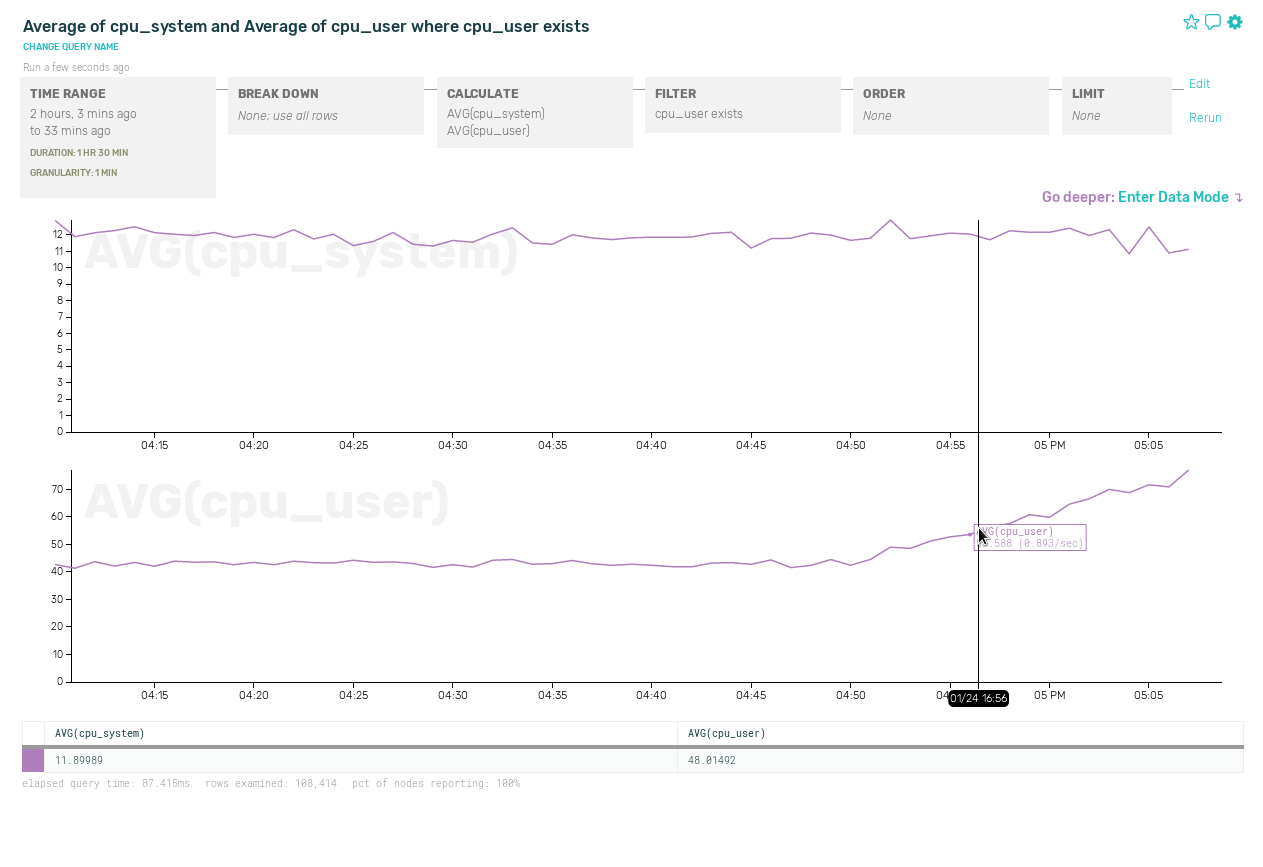
For an example of what you might do with this data, imagine that MongoDB CPU usage is creeping upward, as shown in the graph below. Let’s find out why before the database runs into serious trouble.

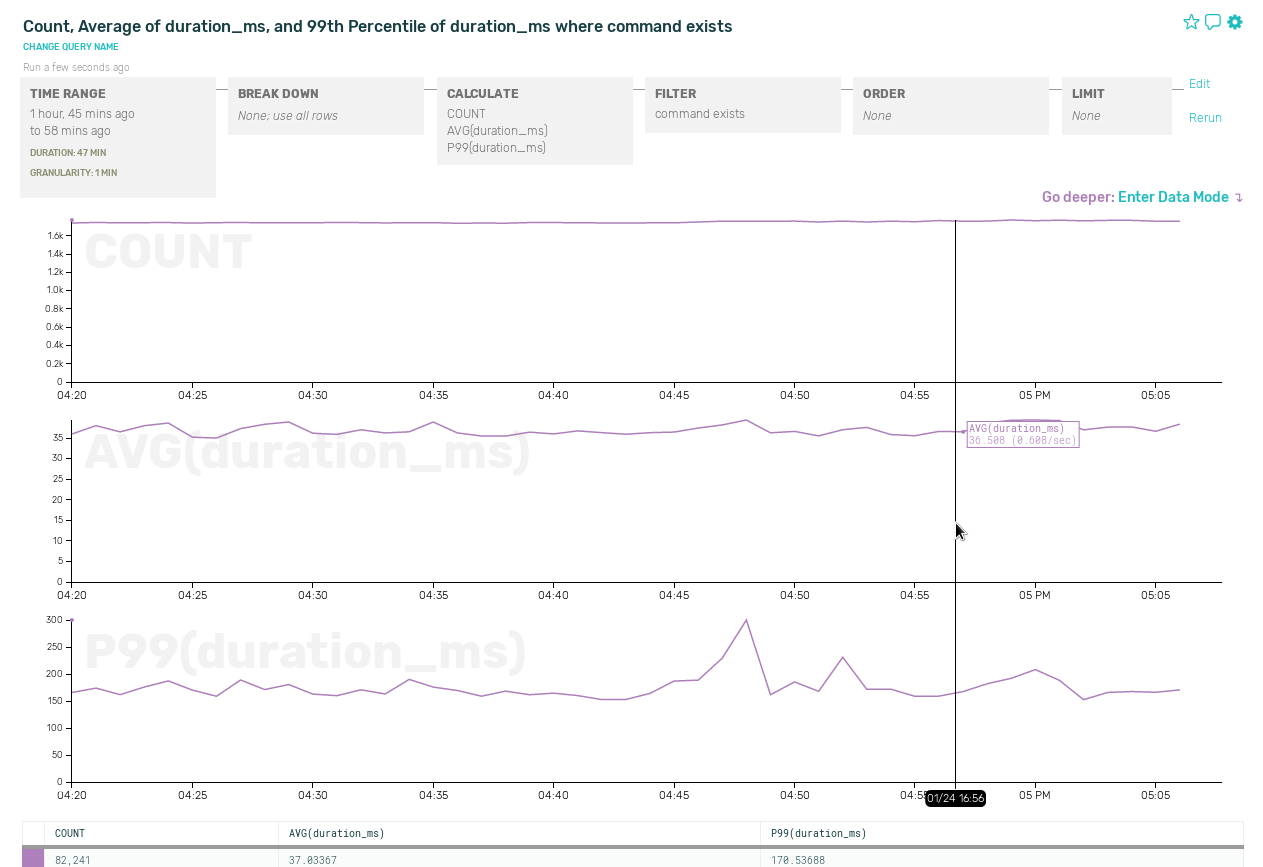
We hypothesize that we’re handling more queries, or that individual queries are becoming more expensive — perhaps because of a missing index. So let’s look at overall query count and latency.

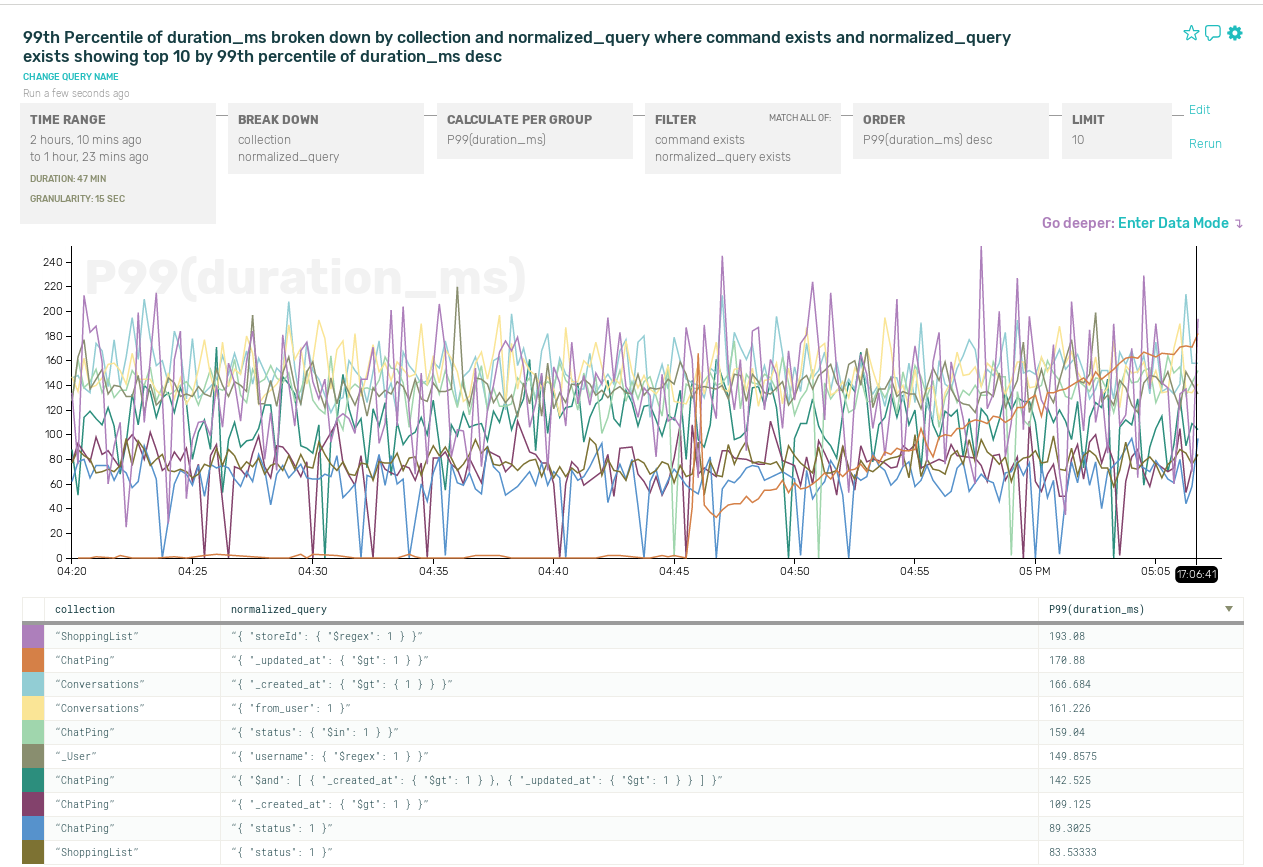
There are no clear trends in these aggregates. But it could be that while the bulk of our query workload is stable, a few queries are behaving badly — yet not enough to skew the aggregated metrics. Let’s break down latency by collection and normalized family:

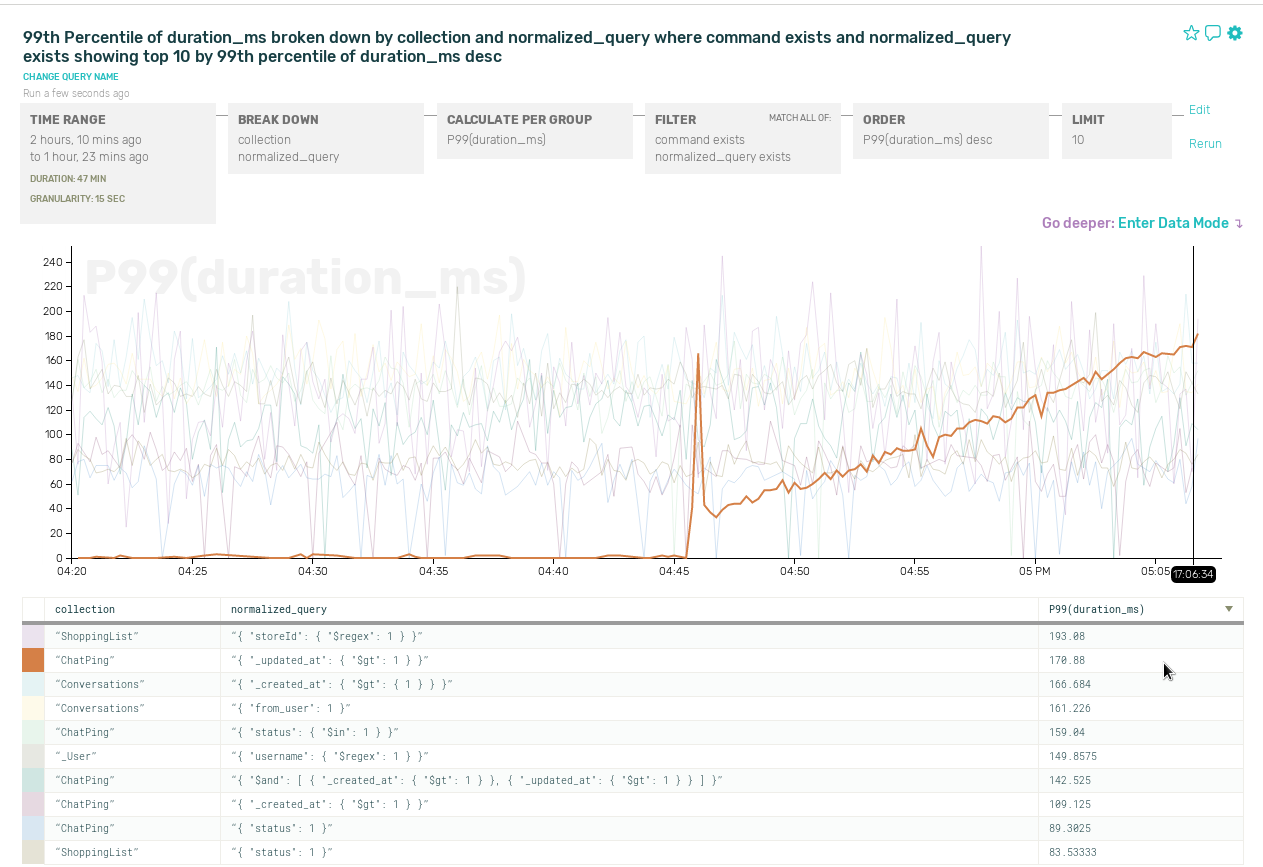
There’s a lot of data here — can we discern any trends in individual series?

There we go. Looks like we have a new query pattern that’s slow and getting slower. Now we can go add the right index.

But Don’t Forget About Logs and Metrics Just Yet

TCP-level analysis is not a panacea. You still need system statistics and slow query logs for high-level instance metrics, and database-internal data — such as lock retention — that can’t be extracted from the TCP stream. Honeycomb helps you ingest server logs and statistics to get a complete picture of what’s going on.

Try it out

Sign up to use Honeycomb with your own data, check out the agent’s source code if you’re curious, and don’t hesitate to get in touch!

Instrumentation: system calls: an amazing interface for instrumentation

When you’re debugging, there are two basic ways you can poke at something. You can:

  • create new instrumentation (like “adding print statements”)
  • use existing instrumentation (“look at print statements you already added”, “use Wireshark”)

When your program is already running and already doing some TERRIBLE THING YOU DO NOT WANT, it is very nice to be able to ask questions of it (“dear sir, what ARE you doing”) without having to recompile it or restart or anything.

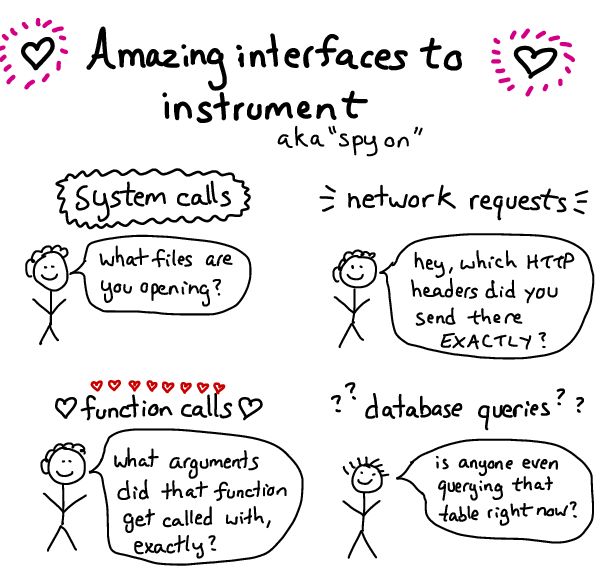
I think about asking questions of a program in terms of “what interfaces does it have that I can observe?”. Can I tell which system calls that program is using? Can I look at its network requests? Can I easily see database queries?

interfaces

In this post, we’ll talk about my very favourite interface: system calls

what’s a system call?

Your program does not know how to open files: it doesn’t know what a hard drive is, or how to read a filesystem, or any of that. However, your operating system does know all that stuff!

System calls are the interface that your program (no matter what programming language it’s in) uses to

why system calls are an amazing interface

System calls are my favorite interface to debug because every program uses system calls.

A few examples of questions that you can ask using system calls:

  • Which files is my program opening or writing to right now? This is surprisingly useful – it has uncovered hidden configuration files and log files for me many times.
  • Which other programs is my program executing? You can see every program that’s being started, and all its arguments
  • Which hosts is my program connecting to (the connect system call). This can also help you see timeouts.

These are all pretty simple questions, but without being able to observe which system calls your program is using, they can be very hard to answer!

How do I see which system calls my program is using?

You use a program called strace on Linux! Or dtruss on OS X.

I have a fanzine about how to use strace, if you are new to it and would like to learn more!

Instrumentation: What does 'uptime' mean?

This is the second post in our second week on instrumentation. Want more? Check out the other posts in this series. Ping Julia or Charity with feedback!

Everybody talks about uptime, and any SLA you have probably guarantees some degree of availability. But what does it really mean, and how do you measure it?

  • If your service returns 200/OK does that mean it’s up?
  • If your request takes over 10s to return a 200/OK, is it up?
  • If your service works for customer A but not customer B, is it up?
  • If customer C didn’t try to reach your service while it was down, was it really down?
  • If the service degraded gracefully, was it down? If the service was read-only, was it down?
  • If you accept and acknowledge a request but drop it, are you really up? What if it retries and succeeds the second time? What if it increments the same counter twice? Is it up if it takes 5 tries but nobody notices because it was in the background? Is it up if the user got a timeout and believed it failed, but in fact the db write succeeded in the background??

We can argue about this all day and all night (buy us a whiskey and we definitely will), but it boils down to this: if your users are happy and think it’s up, it’s up; if your users are unhappy and think it’s down, it’s down. Now we just have to approximate this with measurable things. Here are some places to start.

Start from the top

First, start at the top of your stack (usually a load balancer) and track all requests plus their status code and duration. Successful requests under your promised response time is your first approximation of uptime. Failures here will usually detract from your overall uptime, and successes will usually but not always contribute to your success rate.

“But wait!”, you might be saying. “What is a successful request? Is a 200, any 20, any 20 and 30*? What if there are a bunch of 404s but they’re working as intended? How long is too long? What if I served every request perfectly, but a quarter of users couldn’t reach the site due to Comcast’s shitty router tables? Gaahhh!”

This is where Service Level Agreements (SLA)’s come in. Every word needs to be defined in a way that you and your users agree upon. Which is why you should monitor independently and understand how they’re gathering their numbers. (“No, Frank, I don’t think running nmap from your Comcast At Home line is a great way to determine if I owe you a refund this month.”)

Users complicate everything

Do you have any data sharded by userid? Cool, then your life gets even more interesting! You need to map out the path that each user can take and monitor it separately. Because now you have at least two different availability numbers – the global uptime, and the uptime for each slice of users.

It’s important to separate these, because your engineering team likely measures their progress by the first while your SLA may use the second. If one customer is on a shard that has a 100% downtime for an hour, you don’t want to have to pay out for breaking the SLA for the 100k other customers who weren’t affected.

SLAs are their own particular dark art. Get a Google engineer drunk someday and ask them questions about SLAs. Secretly time them and track their TTT (Time Til Tears).

Ugh, features

And then there’s entry points, and features. Consider all the different entry points you have for specific features. If there’s a different read and write path, you must instrument both. If there are features used by some customers (push notifications, scheduled jobs, lookup services, etc.) that have different entry points to your service, you must weight them and add them to the global uptime metric as well as the SLA for each user.

Measuring failures at each individual point within your service can miss connections between components, which is why end to end checks are the gold standard.

And finally, there’s failures outside your control. For example, if your DNS is misconfigured, your customers will never even arrive at your service in order for you to measure their failure rate. If you are using a cloud load balancer service, some errors will not land in your logs for you to measure. For these types of errors, you need to take your measurements from outside the boundaries of your service.

AWS ate my packets

Your users don’t really care if it’s your fault or your service provider’s fault. It’s still your responsibility. Don’t blog and point fingers, that’s tacky. Build for resilience as much as you can, be honest about where you can’t or don’t want to.

Should you feel responsible? Well, you chose the vendor, didn’t you?

Now you have a whole bunch of numbers. But your users don’t want that either. They just want to know if you were up 99.9% of the time. The more data you give them the more confused they get. Doesn’t anything work? Is Life itself a Lie??

Pause, reconsider your life choices

Want a shortcut? Do these two things:

  • Set up an end to end check for each major path and shard in your service. Use that as your primary uptime measurement.
  • Send events from each subservice application server to a service that can give you per-customer success rates and use that as your secondary source.

Between those two, you will cover 3 nines’ worth of your uptime requirements.

Having something now is better than agonizing over this for long. While your team is busy arguing vigorously about how good your uptime check is, do something simple and start tracking it.