Instrumenting High Volume Services: Part 2

This is the second of three posts focusing on sampling as a part of your toolbox for handling services that generate large amounts of instrumentation data. The first one was an introduction to sampling.

Sampling is a simple concept for capturing useful information about a large quantity of data, but can manifest in many different ways, varying widely in complexity. Here in Part 2, we’ll explore techniques to handle simple variations in your data, introduce the concept of dynamic sampling, and begin addressing some of the harder questions in Part 1.

Constant Sampling

This code should look familiar from Part 1 and is the foundation upon which more advanced techniques will be built:

func handleRequest(w http.ResponseWriter, r *http.Request) {
  // do work
  if rand.Intn(4) == 0 { // send a randomly-selected 25% of requests
    logRequest(r, 4)     // make sure to track a sample rate of 4
  }
  w.WriteHeader(http.StatusOK)
}

Constant sampling is just the idea that you will submit one event for every n events you wish to represent. In the above example, we randomly choose one out of every four events. we call it constant sampling because you’re submitting 25% of all your events—a constant sample rate of 4. Your underlying analytics system can then deal with this kind of sampling very easily: multiply all counts or sums by 4. (Averages and percentiles are unchanged.)

The advantage of this approach is that it is simple and easy to implement. You can easily reduce the load on your analytics system by only sending one event to represent many, whether that be one in every four, hundred, or ten thousand events.

The disadvantage of constant sampling is its lack of flexibility. Once you’ve chosen your sample rate, it is fixed. If your traffic patterns change or your load fluctuates, the sample rate may be too high for some parts of your system (missing out on important, low-frequency events) and too low for others (sending lots of homogenous, extraneous data).

Constant sampling is the best choice when your traffic patterns are homogeneous and constant. If every event provides equal insight into your system, than any event is as good as any other to use as a representative event. The simplicity allows you to easily cut your volume.

Dynamic Sampling

The rest of the sampling methodologies in this series are dynamic. When thinking about a dynamic sample rate, we need to differentiate something we’ve glossed over so far. Here are two ways of talking about sample rate:

  • This dataset is sampled four to one
  • This specific event represents four similar events

Until now we’ve used the two ways of looking at sampling interchangeably, but each contains a different assumption—the first is only true if all the data in the dataset is sampled at the same rate. When all data is sampled at the same rate, it makes calculations based on the stored data very simple.

The second way of talking about sample rates has a different implication—some other event might represent a different number of similar events. If so, it brings up some severe complications—how do you do math on a body of events that all represent a different portion of the total corpus?

When calculating an average based on events that all have different sample rates, you actually need to walk through each event in order to calculate your average and weight each event accordingly. For example, with three events with sample rates of 2, 5, and 10, to calculate the average, you need to multiply the value in the first event by 2, the value in the second by 5, the value int he third by 10, add up those values, then divide by the total number of events represented (17).

value sample rate contribution to the average
205 2 410
317 5 1585
281 10 2810
——- ————- ——
17 4805

Average: 4805 / 17 = 282.65

Within Honeycomb, every event has an associated sample rate and all the calculations we do to visualize your data correctly handle these variable sample rates. This feature lets us start to do some really interesting things with sampling within our own systems: reducing our overall volume while still retaining different levels of fidelity depending on the type of traffic.

Introducing dynamic sampling lets us address some of the harder questions posed in the first post of this series.

Static Map of Sample Rates

Building a static map of traffic type to sample rate is the our first method for doing dynamic sampling. We’re going to enumerate a few different types of traffic and encode different sample rates for each type in our code. By doing so, we can represent that we value different types of traffic differently!

When recording HTTP events, we may care about seeing every server error but need less resolution when looking at successful requests. We can then set the sample rate for successful requests to 100 (storing one in a hundred successful events). We include the sample rate along with each event—100 for successful events and 1 for error events.

func handleRequest(w http.ResponseWriter, r *http.Request) {
  // do work
  if status == http.StatusBadRequest || status == http.StatusInternalServerError {
    logRequest(r, 1)              // track every single bad or errored request
  } else if rand.Intn(100) == 0 {
    logRequest(r, 100)            // track 1 out of every 100 successful requests
  }
  w.WriteHeader(status)
}

By choosing the sample rate based on an aspect of the data that we care about, we’re able to gain more flexible control over both the total volume of data we send to our analytics system and the resolution we get looking into interesting times in our service history.

The advantage of this method of sampling is that you gain flexibility in determining which types of events are more important for you to examine later, while retaining an accurate view into the overall operation of the system. When errors are more important than successes, or newly placed orders are more important than checking on order status, or slow queries are more important than fast queries, or paying customers are more important than those on the free tier, you now have a method to manage the volume of data you send in to your analytics system while still gaining detailed insight into the portions of the traffic you really care about.

The disadvantage of this method of sampling is that if there are too many different types of traffic, enumerating them all to set a specific sample rate for each can be difficult. You must additionally enumerate the details of what makes traffic interesting when creating the map of traffic type to sample rate. While providing more flexibility over a constant rate, if you don’t know ahead of time which types might be important, it can be difficult to create the map. If traffic types change their importance over time, this method can not easily change to accommodate that.

This method is the best choice when your traffic has a few well known characteristics that define a limited set of types, and some types are obviously more interesting for debugging than others. Some common patterns for using a static map of sample rates are HTTP status codes, error status, top tier customer status, and known traffic volume.

For an example of the static map, take a look at the documentation for logstash on our web site and a sample logstash config that includes dynamic sampling based on HTTP status code for logstash.

Up Next - My traffic is a KALEIDOSCOPE of change!

This entry in the series introduced the idea of dynamic sampling. By varying the sample rate based on characteristics of the incoming traffic, you gain tremendous flexibility in how you choose the individual events that will be representative of the entire stream of traffic.

In Part 3 we take the idea of dynamic sampling and apply realtime analysis to dynamically adjust the sample rate! Why stop at a person identifying interesting traffic—let’s let our applications choose how to sample traffic based on realtime analysis of its importance and volume! But until it’s published, try signing up for an account on Honeycomb and sending some data of your own with variable sample rates.
Instrumenting High Volume Services: Part 1

This is the first of three posts focusing on sampling as a part of your toolbox for handling services that generate large amounts of instrumentation data.

Recording tons of data about every request coming in to your service is easy when you have very little traffic. As your service scales, the impact of measuring its performance can cause its own problems. There are three main ways to mitigate this problem:

  • measure fewer things
  • aggregate your measurements before submitting them before submitting them
  • measure a representative portion of your traffic

Each method has its place; this series of posts focuses on the third: various techniques to sample your traffic in order to reduce your overall volume of instrumentation, while retaining useful information about individual requests.

An Introduction to Sampling

Sampling is the idea that you can select a few elements from a large collection and learn about the entire collection by looking at them closely. It is widely used throughout the world whenever trying to tackle a problem of scale. For example, a survey assumes that by asking a small group of people a set of questions, you can learn something about the opinions of the entire populace.

Sampling as a basic technique for instrumentation is no different—by recording information about a representative subset of requests flowing through a system, you can learn about the overall performance of the system. And as with surveys and air monitoring, the way you choose your representative set (the sample set) can greatly influence the accuracy of your results.

This series will explore various methods appropriate for various situations.

A naive approach to sampling an HTTP handler might look something like this:

func handleRequest(w http.ResponseWriter, r *http.Request) {
  // do work
  if rand.Intn(4) == 0 { // send a randomly-selected 25% of requests
    logRequest(r)
  }
  w.WriteHeader(http.StatusOK)
}

By sampling with this naive method, however, we lose the ability to easily pull metrics about our overall traffic: any graphs or analytics that this method produces would only show around 25% of our actual, real-world traffic.

the non-negotiable: capturing the sample rate

Our first step, then, is capturing some metadata along with this sample datapoint. Specifically, when capturing this request, we’d want to know that this sampled request represents 4 (presumably similar) requests processed by the system. (Or, in other words, the sample rate for this data point is 4.)

func handleRequest(w http.ResponseWriter, r *http.Request) {
  // do work
  if rand.Intn(4) == 0 { // send a randomly-selected 25% of requests
    logRequest(r, 4)     // make sure to track a sample rate of 4, as well
  }
  w.WriteHeader(http.StatusOK)
}

Capturing the sample rate will allow our analytics backend to understand that each stored datapoint represents 4 requests in the real world, and return analytics that reflect that reality. (Note: If you’re using any of our SDKs to sample requests, this is taken care of for you.)

OK, but my traffic isn’t ever that simple:

Next, we’re ready to tackle some harder problems:

  • What if we care a lot about error cases (as in, we want to capture all of them) and not very much about success cases?
  • What if some customers send an order of magnitude more traffic than others—but we want all customers to have a good experience?
  • What if we want to make sure that a huge increase in traffic on our servers can’t also overwhelm our analytics backend?

Coming up in parts 2 and 3, we’ll discuss different methods for sampling traffic more actively than the naive approach shown in this post. Stay tuned, and in the mean time, sign up for Honeycomb and experiment with sampling in your own traffic!

Event-Driven Instrumentation in Go is Easy and Fun

One of many things I like about Go is how easy it is to instrument code. The built-in expvar package and third-party libraries such as rcrowley/go-metrics are delightfully simple to use.

But metrics aren’t quite enough! We’re here to encourage you to structure your instrumentation not just around metrics, but around events.

Let’s make that idea concrete with an example. Imagine a frontend API for a queue service. It accepts user input, and writes it into a Kafka backing store. Something like this:

func (a *App) handle(r *http.Request, w http.ResponseWriter) {
    userInfo := a.fetchUserInfo(r.Headers)
    unmarshalledBody := a.unmarshalInput(r.Body)
    kafkaWrite := a.buildKafkaWrite(userInfo, unmarshalledBody)
    a.writeToKafka(kafkaWrite)
}

With a timing helper, we can track — in aggregate – how long it takes to handle a request, and how long each individual step takes:

func (a *App) timeOp(metricName string, start time.Time) {
    a.timers[metricName].UpdateSince(start)

func (a *App) handle(r *http.Request, w http.ResponseWriter) error {
    defer a.timeOp("request_dur_ms", time.Now())
    // ...
}

func (a *App) fetchUserInfo(r.Headers) userInfo {
    defer a.timeOp("fetch_userinfo_dur_ms", time.Now())
    // ...
}

// ...

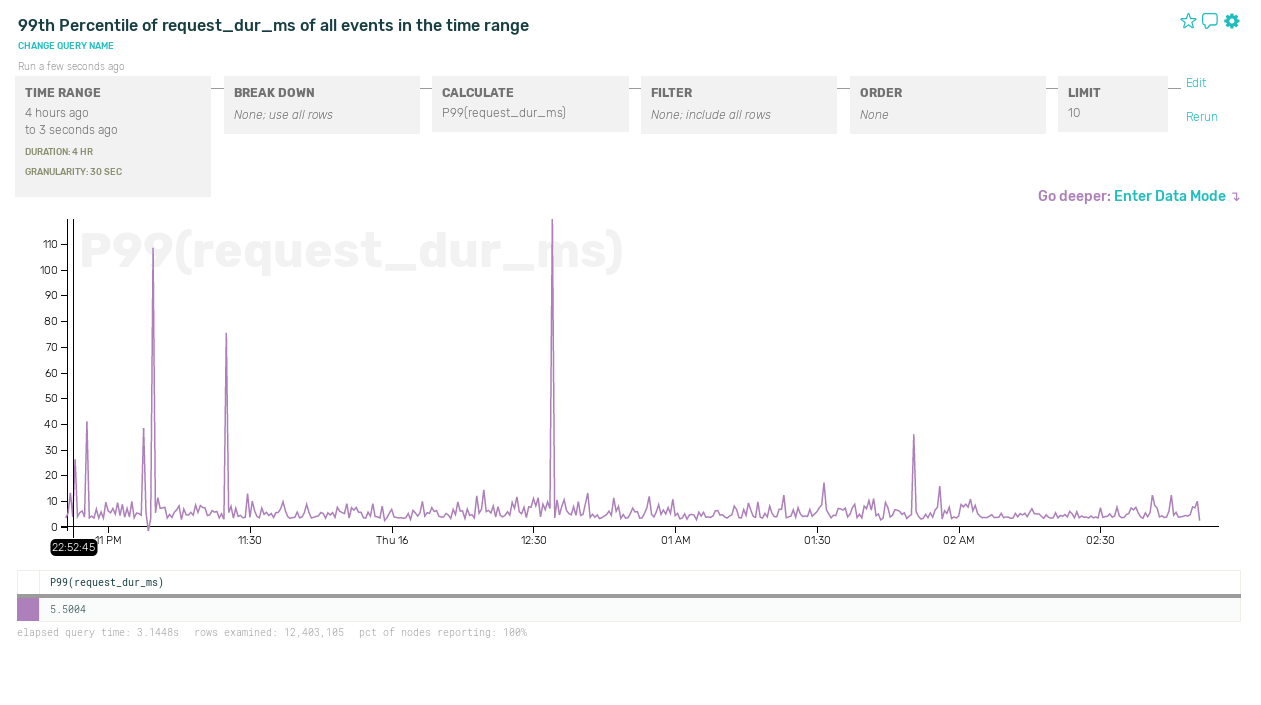
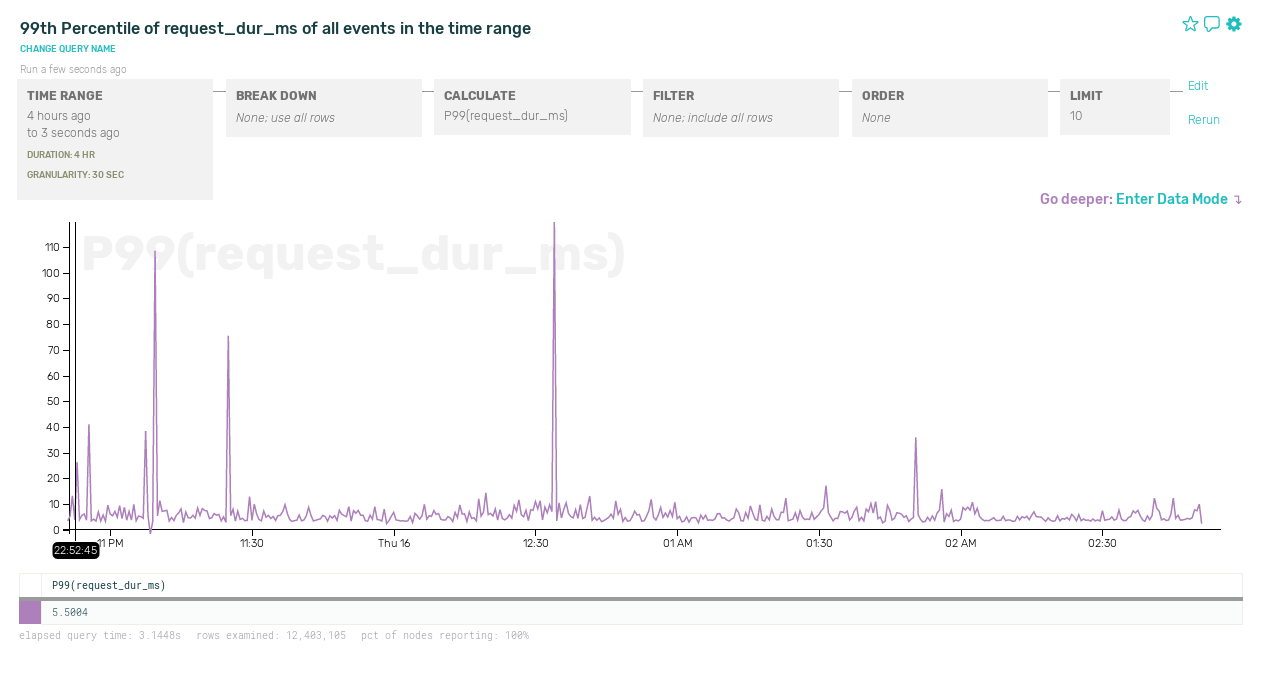
The limitation of this approach is that global timers can show you when an anomaly occurs, but not necessarily why. Let’s say we observe occasional spikes in overall measured request latency:

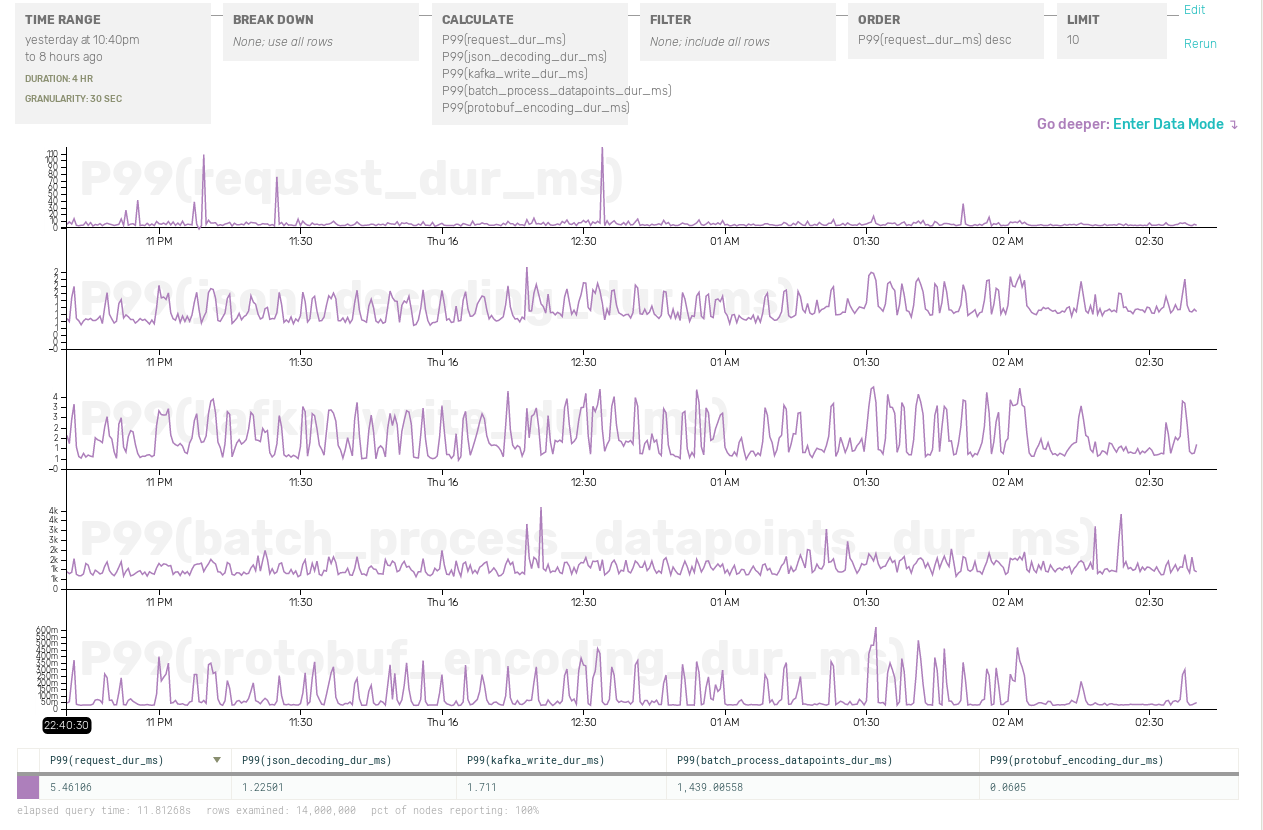
If all we have is sitewide metrics, it’s going to take lot more poking to figure out what’s going on. In fact, our other timing metrics might not have any correlation with those spikes at all:

Contrast this with event-driven instrumentation. It’s not that complicated! We just build up an event object with all the data we want to record: our original timers, plus request URL, user ID, and whatever other data we can think of. Once we’ve handled the request, we ship off the event.

func (a *app) handle (r *http.Request, w http.ResponseWriter) {
    start = time.Now()
    ev := libhoney.NewEvent()
    ev.AddField("url", r.URL.Path)

    userInfo := a.fetchUserInfo(r.Headers, ev)
    ev.AddField("user_id", userInfo.UserID)

    unmarshalledBody := a.unmarshalInput(r.Body, ev)
    ev.AddField("is_batch", unmarshalledBody.IsBatchRequest)

    kafkaWrite := a.buildKafkaWrite(userInfo, unmarshalledBody, ev)
    a.writeToKafka(kafkaWrite)

    ev.AddField("request_dur_ns", time.Now().Sub(start))
    ev.Send()
}

Here we’re using libhoney, Honeycomb’s lightweight library for Go. Honeycomb is built to handle exactly this type of wide, flexibly typed event data. Send it all! The more fields you can think of, the better.

The usefulness of this approach becomes clear when tracking down actual problems. Let’s go back to that latency spike:

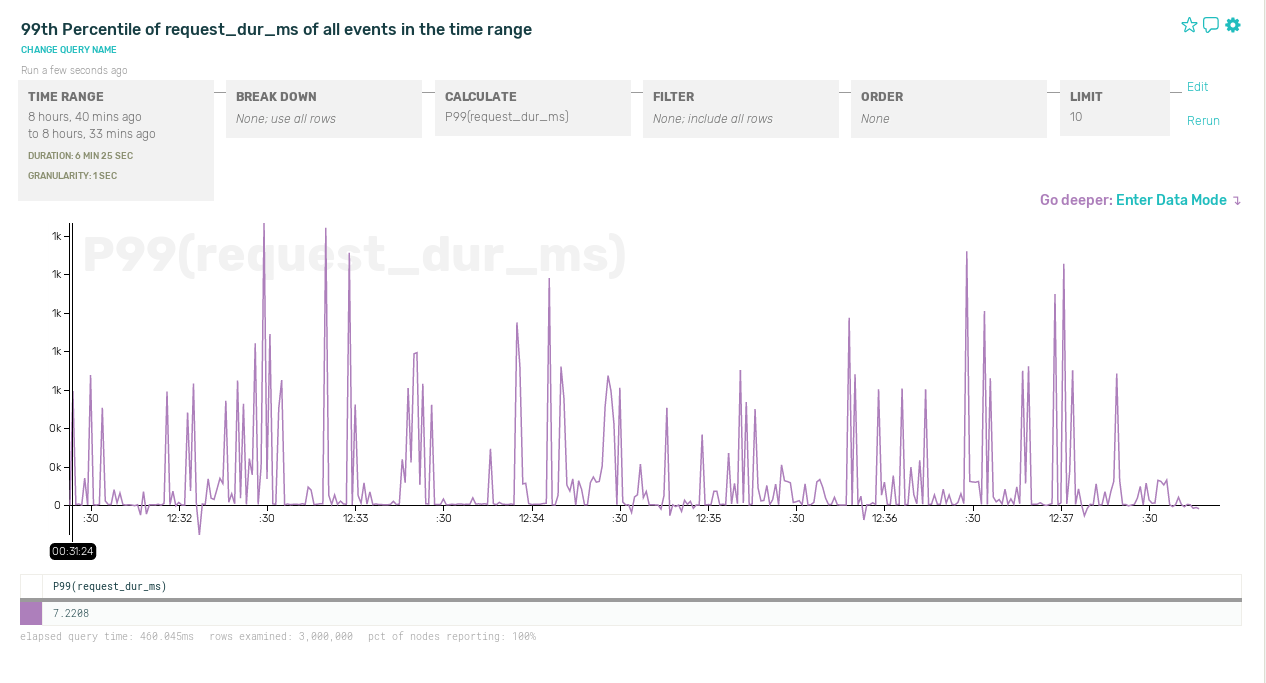
Zooming in on one of those spikes, 99th-percentile latency on a smaller time interval looks pretty erratic:

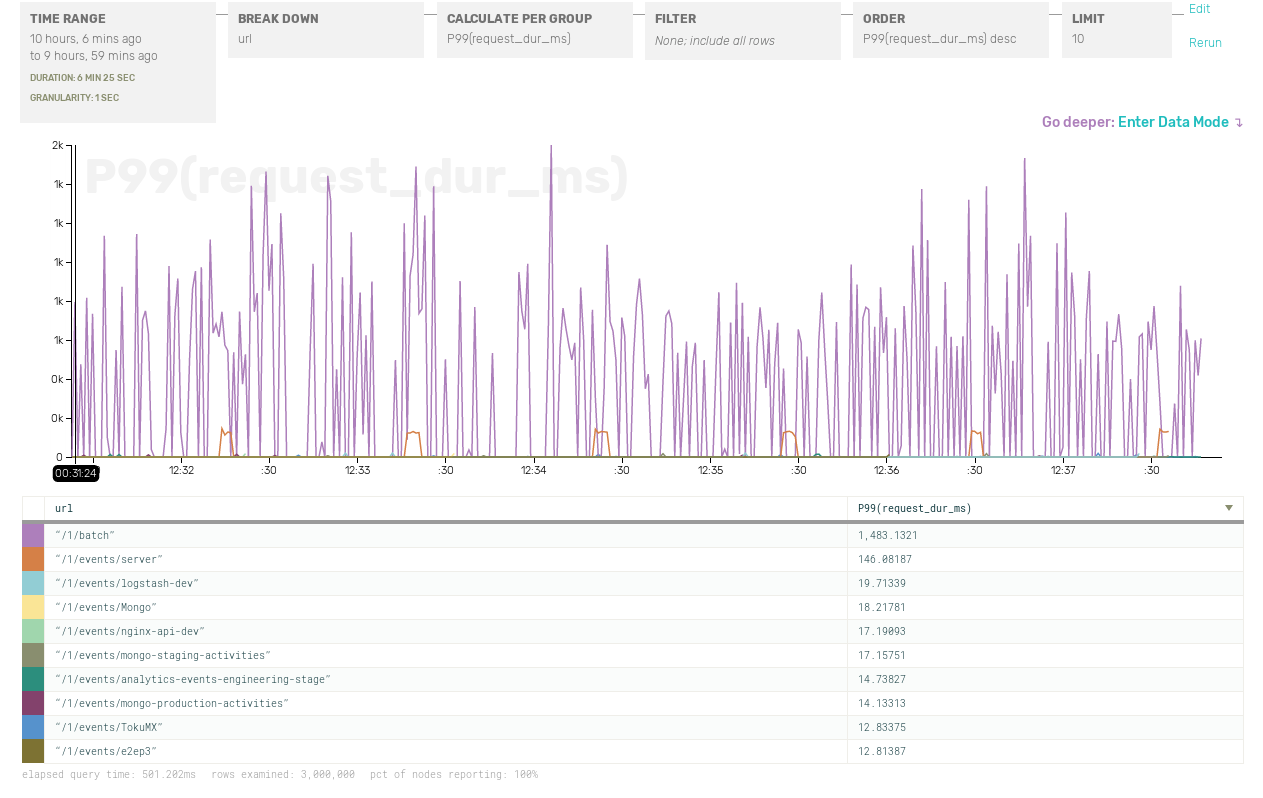
Let’s try to breaking down the data by URL:

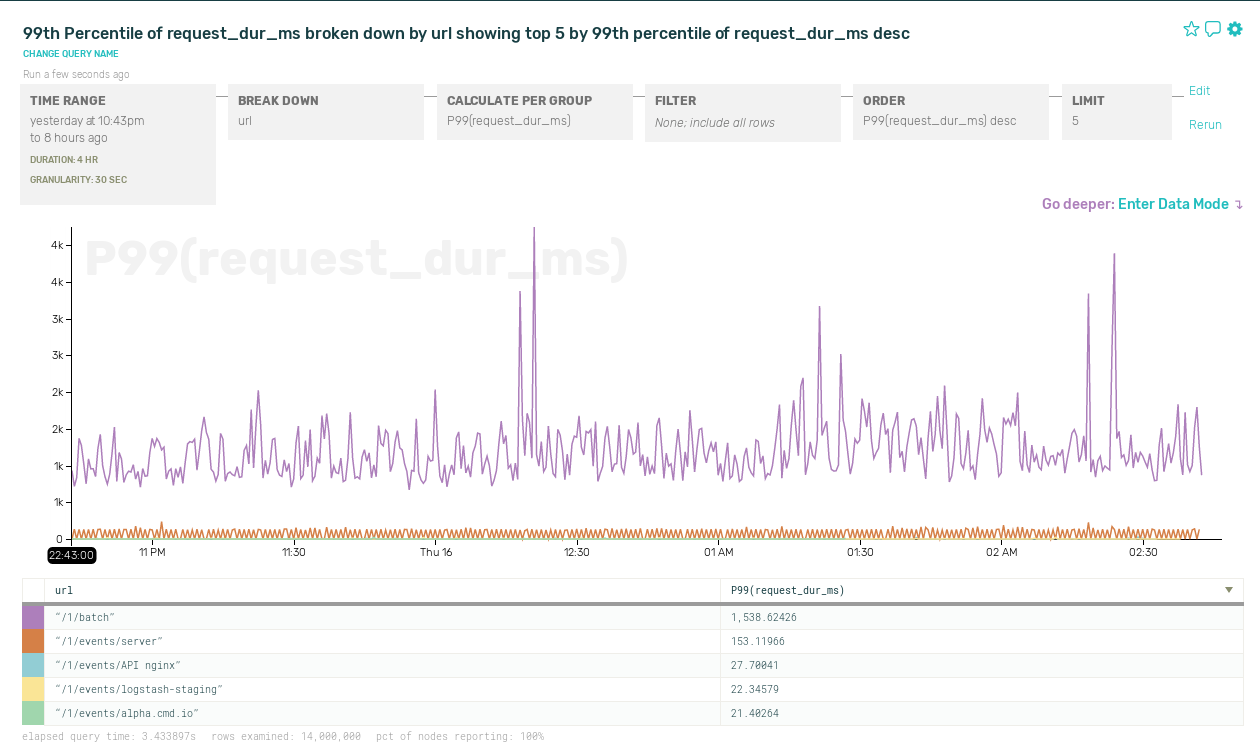
Aha! Looks like it’s requests to /1/batch that are slow. Zooming back out in time, but breaking down response times by URL, here’s what’s really going on. We have a pretty bimodal latency distribution — slow batch requests and fast normal requests — and sometimes this skews the P99 metric:

Of course, we could have figured this out by adding separate timing metrics for each API endpoint. But if you want to slice and dice by user ID, request length, server host, or any other criteria you can think of, you’ll quickly find yourself facing a combinatorial explosion of metrics.

So please, instrument in terms of events, not just metrics!

Head on over to https://ui.honeycomb.io/signup to get started, run go get github.com/honeycombio/libhoney-go, and add a couple lines of instrumentation to your code. Do it right now! Thank yourself later!

Tell me more, nginx

When the cool kids talk about interesting log data, no one seems to want to talk about nginx. Web servers are the workhorses of the internet, reliable and battle-hardened, but the logs are standard and never have anything of the interesting application metadata anyway.

But wait! Web logs are also often one of the easiest, broadest sources of data for systems at a high level—and are killer for answering questions like “Oops—I forgot to instrument my new feature, how much is its corresponding endpoint actually being hit?” or “Uh… how many req/sec is this service serving, really?”

There’s an almost infinite number of possible customizations given enough time and patience, but here are a couple quick wins we’ve found particularly essential:

  • Request time (docs): Did you know that nginx can calculate start-to-finish times per request, right out of the box? Don’t leave the house without this one, folks: just add $request_time anywhere in your log_format directive.
  • Upstream response headers (docs): Tuck useful metadata from your application into your HTTP response headers, and tell nginx to pull X-Whatever-You-Want out into your logs.

Voilà! User IDs, database timers, and server metadata—right alongside high-level, granular data surrounding each request.

Let’s take a look at what that can tell us about a service:

Better nginx exploration: manipulating request_time and endpoint_shape

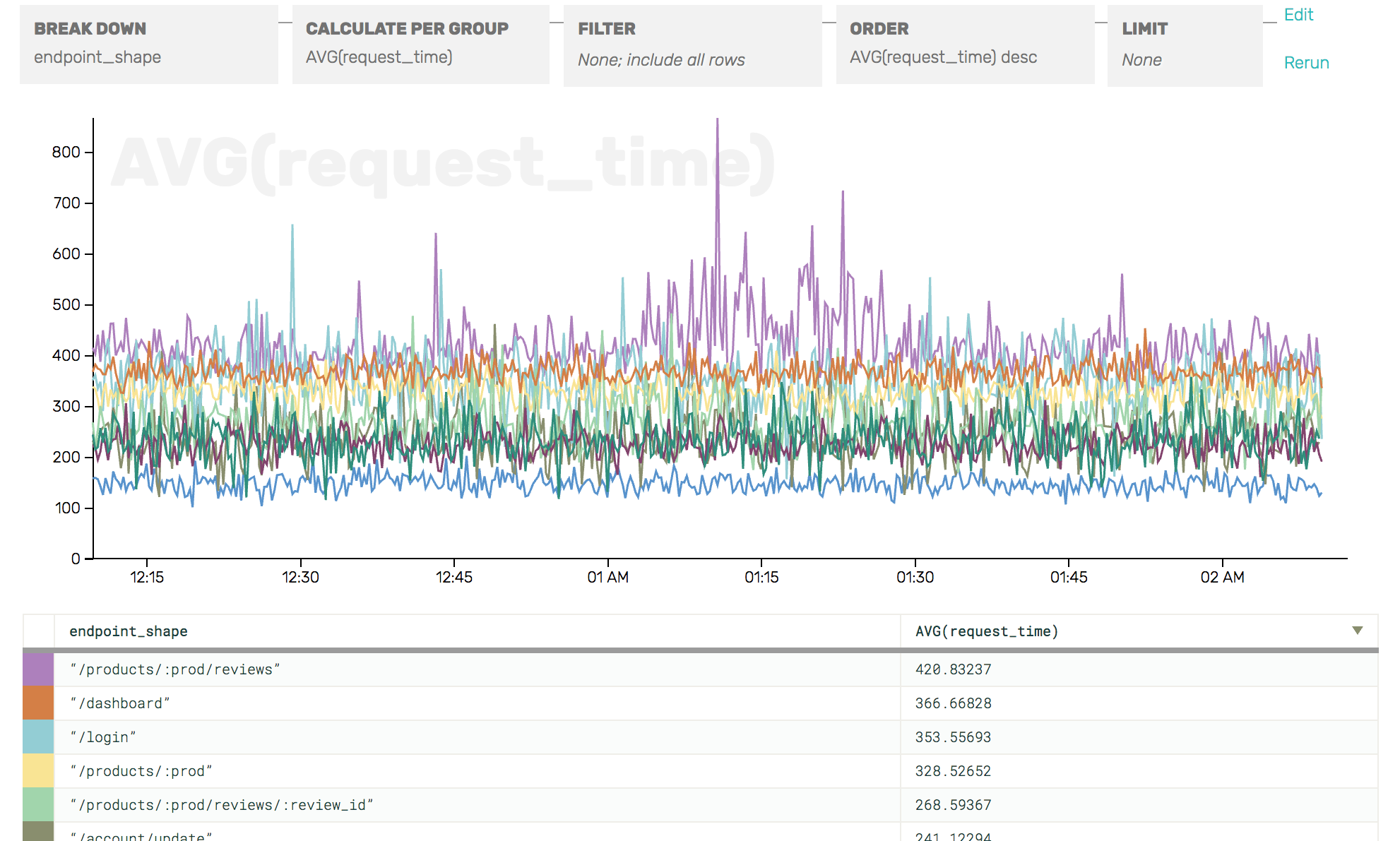
With just request_time and a header value generalizing the shape of the endpoint path (e.g. /products/foobarbaz/products/:prod), we can see—incredibly quickly—which endpoints (not specific URLs!) are the slowest, or the most numerous, or causing the most load on my server.

Guess what else we can do with nginx?

Oops! you’ll have to wait for the next installment.

The sky’s the limit when it comes to slicing this birds’-eye view of your web traffic by arbitrary app metadata: ID the users seeing the most 404s, or graph load by availability zone, hostname, or database cluster! Read more about working with response headers here or sign up to give it a whirl today :)

Note: we talk about upstream response headers as a way to get normalized endpoint shapes, but our nginx connector can do that for you, too!